
The Problem with "One-Click Boost" Cleaners
Legacy cleanup utilities rely on broad path matching. They search for names like temp, cache, log, or build and aggressively trigger permanent file unlink calls.
For everyday software engineers, graphic artists, and video editors, this behavior is catastrophic:
- Compiler Cache Destruction: Deleting Rust
target/or Go build caches during a live compilation locks open handles and triggers build crashes. - Uncommitted Code Loss: If you created an experimental file inside a temporary scratch folder, naive tools permanently wipe it without confirmation.
- Registry & Preference Corruption: Registry "cleaners" frequently remove valid COM registrations, breaking developer runtime tools.
The DriveXos Principle: Zero Collateral Damage
DriveXos was built on the core assumption that your data is sacred. A storage tool should provide radical clarity and assist you in identifying heavy items, but it must never execute deletions without passing cryptographic and contextual safety gates.
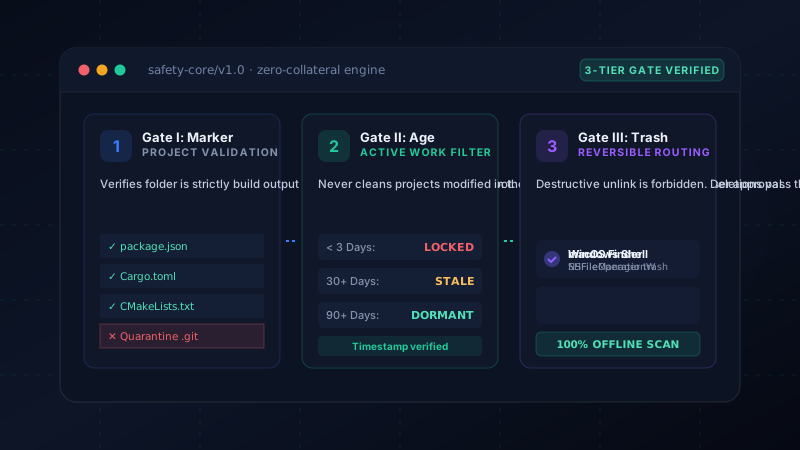
The 3-Tier Safety Gate Model
Every deletion suggested by DriveXos must survive three distinct validation layers before an operation can be scheduled:
Tier I: Project Marker Confirmation
DriveXos will never categorize a folder as disposable build output based merely on its folder name. To classify a folder as a candidate for developer cleanup, DriveXos verifies the parent directory for genuine project markers:
package.jsonorpnpm-lock.yamlfor Node.js projectsCargo.tomlfor Rust target artifactsbuild.gradleorpom.xmlfor JVM projectsCMakeLists.txtorMakefilefor C/C++ builds
If no project marker is detected, the directory is treated as user data and quarantined from bulk-clean options.
Tier II: Age and Activity Thresholds
Files touched in the last 72 hours are automatically locked. Even if a folder matches all build criteria, if its modification timestamp shows you worked on it yesterday, DriveXos excludes it from recommendations:
Last Modified < 3 Days:    LOCKED    (Active in-flight development)
Last Modified > 30 Days:   ELIGIBLE  (Safe for review)
Last Modified > 90 Days:   DORMANT   (Recommended for pruning)
Last Modified > 180 Days:  ABANDONED (High reclamation priority)
Tier III: Native Reversible Routing (Trash vs Unlink)
Traditional command-line scripts use destructive unlinks (e.g. unlink(), rmdir) which bypass the operating system's safety net. DriveXos routes all file removals through native OS trash APIs:
- On Windows:
SHFileOperationWwithFOF_ALLOWUNDOflag. - On macOS:
NSFileManager.trashItem(at:resultingItemURL:).
If you ever realize that you needed a file that was deleted, it is sitting safely in your Recycle Bin or Trash, ready to be restored in one click.
100% Local, Offline, and Honest
Modern security demands zero data exfiltration. DriveXos has no telemetry servers, no user accounts, and never sends file listings across the internet. The application works completely offline, honoring your privacy and enterprise compliance policies.
← Docker Desktop: Where Did My Disk Space Go?
Hunting Down Duplicate Files with SHA-256 →
Experience Honest, Safe Disk Cleanup
Clean your drives without fear. DriveXos gives you verified safety gates, full visual previews, and non-destructive trash routing.