
The Fatal Flaws of Filename Matching
Early storage tools relied on simple metadata comparisons: if two files shared the same filename and modified timestamp, they were declared identical. In the real world, this logic fails in both directions:
- False Negatives (Missed Duplicates): You download an image as
invoice.pdf, and a week later download it again asinvoice (1).pdf. Or you copy raw camera photos from an SD card into a backup folder namedTrip_Final_01.jpg. Because filenames differ, naive tools never spot them. - False Positives (Dangerous Deletions): Different projects might each contain a file named
index.ts,styles.css, ordata.jsonwith similar sizes. Deleting one based on name alone destroys project integrity.
The Cost of Full Hashing
Cryptographic hashes (like SHA-256) generate a unique 256-bit fingerprint of file contents. If two files produce the same SHA-256 hash, the probability of them having different data is less than 1 in \(10^{77}\)-practically impossible.
However, naively computing SHA-256 on every single file across a 1TB SSD is terribly slow. Reading 500GB of small files from disk saturates I/O buses and consumes massive CPU cycles.
The DriveXos Multi-Stage Deduplication Pipeline
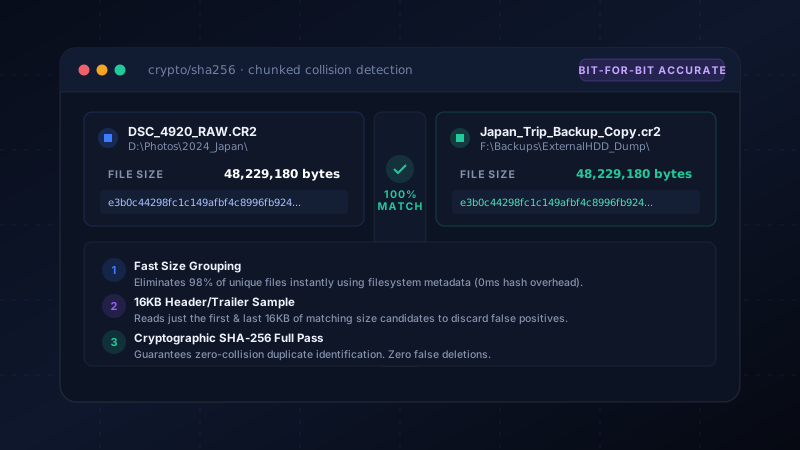
To combine cryptographic infallibility with blazingly fast scanning, DriveXos employs a 3-Stage Filter Pipeline that eliminates 99% of disk I/O before performing full hashes:
[All Files on Drive]
         │
         ▼ (Stage 1: File Size Grouping via MFT)
[Size Clusters > 1 File]  --> 98% of unique files discarded with 0ms read I/O
         │
         ▼ (Stage 2: 16KB Header & Trailer Quick Check)
[Candidate Match Pool]    --> Discards 95% of same-size files with 32KB read
         │
         ▼ (Stage 3: Full SHA-256 Stream Hash)
[Bit-for-Bit Verified Duplicates] --> Zero false positives, guaranteed safe
Stage 1: Exact Size Grouping (Zero Read I/O)
Two files cannot be duplicates if their exact file sizes (in bytes) differ. By querying filesystem metadata (NTFS Master File Table on Windows or APFS catalog on macOS), DriveXos organizes millions of files into size buckets without reading a single byte of their content from disk.
Any file with a unique byte size is instantly disregarded.
Stage 2: 16KB Head & Tail Chunk Probing
For files that share the exact same byte count, reading entire 4GB video files or 50MB RAW photos is still wasteful if they differ in the very first block.
DriveXos reads just 16KB from the start and 16KB from the end of each candidate file. For video containers, compiled binaries, and compressed archives, headers and footers contain distinct timestamps, frame tables, and magic numbers that expose differences in milliseconds.
Stage 3: Cryptographic SHA-256 Verification
Only candidates that match byte-for-byte in both size and 32KB chunk hashes advance to Stage 3. Here, a full streaming SHA-256 hash is computed and compared.
Bit-for-Bit Certainty
When DriveXos presents duplicate groups, it displays their identical SHA-256 checksums alongside folder origins, creation dates, and preview thumbnails. You can safely keep the primary copy and recycle redundant backups.
Smart Selection Rules
Finding duplicates is only half the battle; choosing which copy to keep is where users get stuck. DriveXos provides automated smart-pick rules:
- Keep Oldest: Preserves the original file and marks newer duplicate copies for deletion.
- Keep Shortest Path: Keeps the organized file in
D:\Photos\and marks the loose copy inC:\Users\Downloads\. - Selective Drive Prioritization: Prioritizes keeping files on fast NVMe drives while cleaning duplicate copies from external drives.
← Why Safe Storage Analyzers Need Safety Gates
Find and Clean Duplicate Files with Bit-Level Precision
Stop wasting precious SSD storage on duplicate downloads, raw photos, and videos. Scan your drive in seconds with DriveXos.