
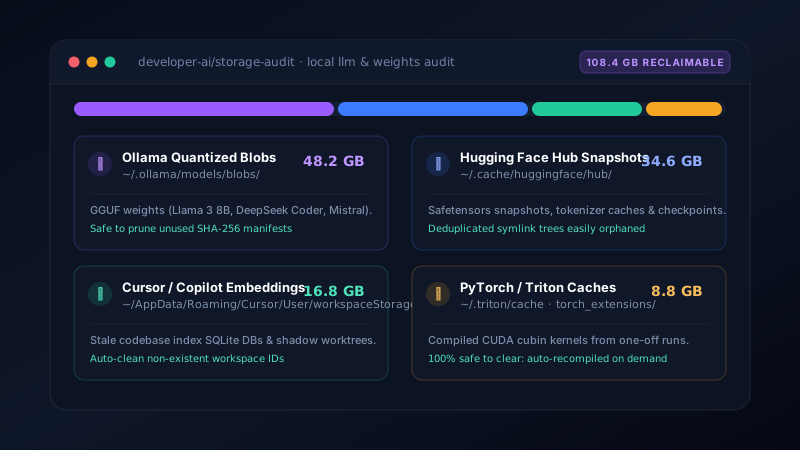
How Local AI Workflows Turn Into 100 GB Ghosts
Just three years ago, a developer's main storage enemy was node_modules, Docker containers, and Gradle caches. But the rise of local LLM inference and AI agentic coding environments introduced a brand new class of massive binary storage consumers.
Unlike a normal text cache or log folder, modern AI artifacts are huge: a single quantized 4-bit 8B parameter model is 4.7 GB; an unquantized 70B model or fine-tuning checkpoint exceeds 140 GB. Furthermore, because these tools prioritize zero-friction experimentation, they download and cache files with cryptographic hash filenames in hidden user profile directories that standard system cleaners never touch.
Ollama Model Blobs: The Hidden Layer Storage
When you run ollama run llama3:8b or pull specialized coding models like deepseek-coder, Ollama does not save single recognizable .gguf files in your Downloads folder.
Instead, Ollama splits model architectures into multiple content-addressed SHA-256 blobs:
- Windows Location:
C:\Users\<You>\.ollama\models\blobs\ - macOS Location:
~/.ollama/models/blobs/
If you test three different variations or quantizations of a model (e.g. q4_k_m, q5_k_m, and q8_0), Ollama keeps each independent layer permanently on your drive. Even when you run ollama rm <model>, orphaned layers and cached manifests frequently linger on disk until an explicit garbage collection pass is performed.
Hugging Face Hub Snapshots and Orphaned Symlinks
Anyone working in Python with transformers, diffusers, or vllm relies on the Hugging Face hub library.
Hugging Face stores all downloaded weights in a shared central repository:
# Default cache location on Windows:
C:\Users\<You>\.cache\huggingface\hub\

# Default cache location on macOS / Linux:
~/.cache/huggingface/hub/
The Hugging Face cache architecture uses a deduplicated symlink structure:
- Actual binary weights are placed inside
models--<org>--<repo>/blobs/. - Commit snapshots are created in
models--<org>--<repo>/snapshots/<commit-hash>/as symlinks pointing back to the blobs.
If you accidentally delete or move a snapshot folder in File Explorer or Finder, the multi-gigabyte blobs remain intact in the blobs/ directory. Over months of research and development, this directory routinely inflates beyond 50 to 80 GB without ever showing up in your project workspaces.
Cursor, Windsurf, and Copilot Workspace Embeddings
AI-native code editors index your entire codebase locally into vector embeddings to allow contextual codebase chat (e.g. @codebase).
Where do these vector indexes live?
| Editor | Platform | Underlying Index Path |
|---|---|---|
| Cursor | Windows | %APPDATA%\Cursor\User\workspaceStorage\<hash>\ |
| Cursor | macOS | ~/Library/Application Support/Cursor/User/workspaceStorage/ |
| VS Code / Copilot | Windows | %APPDATA%\Code\User\workspaceStorage\<hash>\ |
| Windsurf | macOS | ~/Library/Application Support/Windsurf/User/workspaceStorage/ |
Each workspace hash folder contains full SQLite databases (state.vscdb), semantic search indexes, and shadow Git copies of modified files. If you work across dozens of Git branches or temporary cloned repositories, the editor never deletes obsolete workspace directories. It is common to find 15–25 GB of dead workspace storage from projects you deleted months ago!
PyTorch Triton CUDA Kernel Cache
If you run GPU inference or fine-tuning with modern PyTorch (version 2.0 and newer), the underlying compiler (OpenAI Triton / Inductor) compiles optimized GPU kernel binaries (.cubin files) for every distinct tensor shape and data type your code encounters.
These compiled kernels are saved in:
~/.triton/cache/~/.cache/torch/kernels/C:\Users\<You>\AppData\Local\torch_extensions\
Because tensor shapes vary with batch sizes and sequence lengths, this cache steadily fills with tens of thousands of tiny binary files that fragment your SSD file system. This directory is 100% disposable: deleting it will never break PyTorch; kernels are simply re-compiled whenever needed.
The Safe Order of Cleanup in DriveXos
Deleting AI files haphazardly can force you to re-download 30 GB weights during an offline flight or break a running Python venv. DriveXos provides a dedicated developer cleanup mode that isolates AI artifacts safely:
- Prune Stale Workspace IDs: In DriveXos, open Applications Breakdown → Cursor / VS Code. DriveXos compares workspace hashes against your current filesystem and flags storage belonging to deleted repositories.
- Audit Ollama Models: List all layers grouped by model name and last modified date. Keep only the active quantized models you actually invoke.
- Flush Triton and Kernel Caches: Clear temporary compiled kernels in one click.
- Deduplicate Hugging Face Blobs: Remove unlinked blobs whose snapshot symlinks have been severed.
With this targeted approach, developers routinely recover 40 to 120 GB on their primary development drives in under two minutes without disturbing active projects or credentials.