
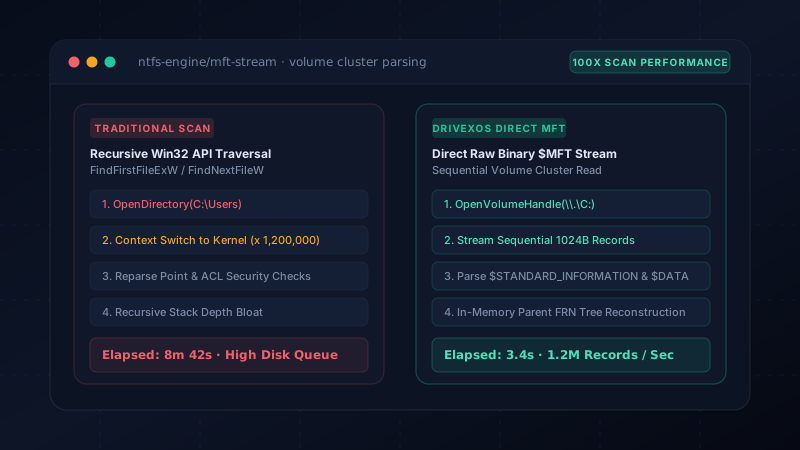
The Hidden Bottleneck of Win32 FindFirstFile Traversal
The overwhelming majority of disk cleanup and tree-size utilities on Windows rely on the standard high-level Win32 directory APIs: FindFirstFileW and FindNextFileW (or .NET's Directory.EnumerateFiles wrapper).
On paper, this appears logical: you open C:\, iterate through child folders, and recursively descend down the directory tree. However, under the hood of the Windows NT kernel, each individual folder traversal incurs a massive operational tax:
- Ring 3 to Ring 0 Context Switches: For every directory in a tree containing 1,500,000 files (typical on a developer machine with
node_modulesand Git repositories), the CPU switches back and forth between user mode and kernel mode millions of times. - Security Descriptor Evaluation: Every API call forces the NTFS driver to evaluate Access Control Lists (ACLs) and security identifiers (SIDs) against the calling process token.
- Random I/O Thrashing: Directory index nodes ($INDEX_ROOT and $INDEX_ALLOCATION) are scattered across non-contiguous clusters on disk, forcing high disk queue depths even on high-bandwidth PCIe Gen 4 SSDs.
The result is sluggish, CPU-bound traversal where the application spends 95% of its execution time waiting on kernel API boundary transitions rather than reading file metadata.
Inside the NTFS Master File Table ($MFT)
NTFS does not store files in an arbitrary web across disk sectors. Instead, every volume maintains a centralized relational index called the Master File Table ($MFT), located at reserved inode $MFT.
In NTFS, everything is a file, and every file on the volume corresponds to a fixed-size 1,024-byte record inside the MFT. Each 1 KB record contains:
| Offset / Attribute | Header Identifier | Contained Metadata |
|---|---|---|
| Magic Header | 0x00 ('FILE') |
Indicates valid record signature and update sequence array offset. |
| Record Number | Record FRN |
64-bit unique File Reference Number on the volume. |
| $STANDARD_INFORMATION | 0x10 |
Timestamps (created, modified, accessed) and FAT attributes (hidden, system). |
| $FILE_NAME | 0x30 |
UTF-16 filename, parent directory record reference number, and allocated file size. |
| $DATA | 0x80 |
Actual non-resident cluster runs or resident inline data. |
Because the MFT is formatted as a continuous, dense sequence of 1,024-byte structs, reading the metadata for 1,000,000 files requires streaming only ~1 GB of sequential raw data from disk. On a 5,000 MB/s NVMe drive, the raw read takes less than 250 milliseconds!
How Direct MFT Streaming Works in Code
Rather than issuing recursive folder queries, a high-performance scanner opens a raw volume handle (e.g. CreateFileW(L"\\\\.\\C:", GENERIC_READ, ...)) and issues the Windows File System Control code:
// Issuing FSCTL_GET_NTFS_VOLUME_DATA to obtain $MFT cluster bounds
DeviceIoControl(
    hVolume,
    FSCTL_GET_NTFS_VOLUME_DATA,
    NULL, 0,
    &ntfsData, sizeof(ntfsData),
    &bytesReturned, NULL
);

// Streaming records via FSCTL_ENUM_USN_DATA or raw volume cluster reads
MFT_RECORD_HEADER* record = (MFT_RECORD_HEADER*)buffer;
if (record->Magic == 0x454C4946) { // "FILE" in little-endian
    uint64_t parentRecord = ExtractParentFRN(record);
    uint64_t fileSize = ExtractAllocatedSize(record);
    FastString fileName = ExtractFileName(record);
    fastIndex.Add(record->RecordNumber, parentRecord, fileSize, fileName);
}
Once the linear scan finishes, the hierarchy is assembled entirely in memory in one pass by linking child parentRecord pointers to their parent directory records. There are no recursive stack calls, zero kernel security boundary roundtrips, and zero disk latency during tree construction.
Handling Junctions, Reparse Points, and Hardlinks
While direct MFT parsing is orders of magnitude faster, building a production-grade engine requires resolving several intricate filesystem quirks:
- Reparse Points & Directory Junctions: Traditional traversal easily gets trapped in infinite symlink loops (such as legacy Windows shortcuts like
C:\Users\User\Application Data\Application Data\...). MFT engines bypass this entirely because reparse flags (IO_REPARSE_TAG_MOUNT_POINT) are inspected instantly without following the link target. - Hardlinks: Multiple file records can point to the same physical disk clusters. Naive tools count duplicate space multiple times; a proper MFT parser deduplicates by cluster allocation runs.
- Privilege Escalation & Non-Admin Fallbacks: Opening raw volume handles requires Administrator permissions. A dependable tool must seamlessly fallback to parallelized, IOCTL-optimized Win32 traversal whenever running under standard user accounts.
The DriveXos Hybrid Engine: Blending Raw MFT with User Safety
In DriveXos, this architecture is implemented inside CleanOSx.Core.Services.Scanning.Ntfs. The engine automatically detects volume filesystem formats:
- If launched with administrative rights on an NTFS volume, it activates the MftReader, indexing a full 2 TB drive in 3–5 seconds.
- If running under non-elevated user mode or on non-NTFS external drives (exFAT/FAT32), it transparently delegates to the multi-threaded ScanEngine with threadpool work-stealing.
- Before any cleanup operation is ever suggested, every path identified in the MFT is checked against the SafetyEngine to protect operating system integrity.
By separating high-velocity indexing from safety verification, developers and power users get instant scan results without compromising on reliability.