
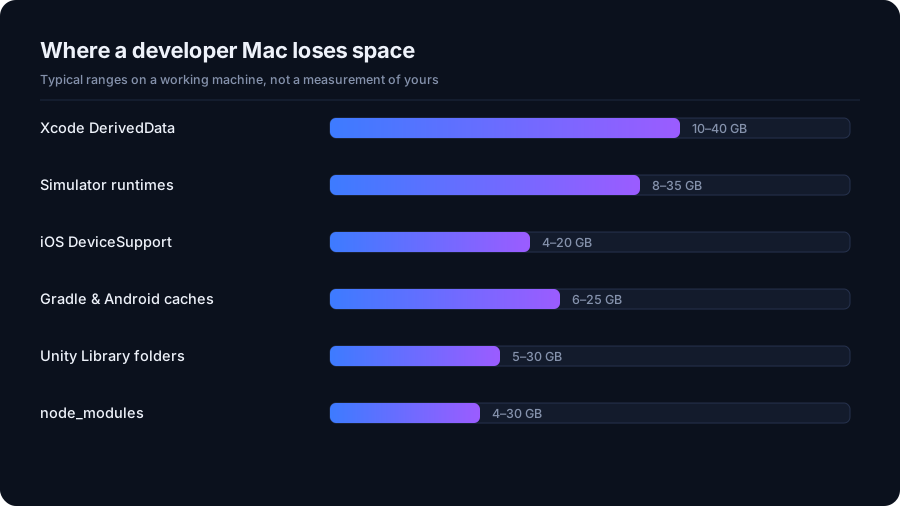
Xcode is the biggest single offender
Four folders under ~/Library/Developer/Xcode account for most of it. Derived data
is intermediate build output, one folder per project, kept forever. Device support files are
symbol sets copied from every iPhone you have ever plugged in, one per iOS version. Simulator
runtimes stay installed after you stop targeting that version. Archives are every build you
ever exported.
# Intermediate build output — rebuilt on the next build
rm -rf ~/Library/Developer/Xcode/DerivedData/*

# Symbol sets for iOS versions you no longer debug against
du -sh ~/Library/Developer/Xcode/iOS\ DeviceSupport/*

# Simulators whose runtime is no longer installed
xcrun simctl delete unavailable
Archives are not disposable
~/Library/Developer/Xcode/Archives holds the dSYM files that symbolicate crash
reports for builds you have shipped. Delete an archive and you lose the ability to read
crashes from that release. Move them to an external drive instead.
Android Studio
Three separate caches grow independently: the Gradle dependency cache in
~/.gradle/caches, build output in each project's build/ folders, and
virtual devices in ~/.android/avd. Each AVD is a full disk image, commonly 8 GB
and up, and deleting the emulator from the Device Manager is the safe way to remove one.
The Gradle cache is safe to clear, with the obvious cost: the next build re-downloads everything it needs.
Unity
Every Unity project keeps a Library folder holding imported asset artifacts. It is
regenerated from your assets and your version control should already be ignoring it, which
makes it safe to delete on any project you are not actively building — at the price of a long
reimport next time you open it. Old editor versions under
/Applications/Unity/Hub/Editor are worth checking too; each install is several
gigabytes.
The rule that keeps this safe
Delete build output, never sources. A folder is safe to remove when a tool can recreate it from
files you still have — derived data, caches, node_modules, target,
Library. It is not safe just because it is called build: plenty of
projects keep hand-written files in a folder with that name.
DriveXos checks for a project marker — a package.json, Package.swift,
build.gradle, Cargo.toml and so on — before it will even list a folder
as build output, which is why a folder that merely happens to be named build is
never offered for deletion.
A quick audit
Before deleting anything, find out which of these actually apply to your machine. Every command here only reads:
du -sh ~/Library/Developer/Xcode/* 2>/dev/null | sort -h
du -sh ~/.gradle ~/.android ~/.m2 ~/.cargo ~/.npm 2>/dev/null
du -sh ~/Library/Caches/CocoaPods ~/Library/Caches/org.swift.swiftpm 2>/dev/null

# Every node_modules under your projects folder, largest last
find ~/Projects -name node_modules -maxdepth 4 -type d -prune -exec du -sh {} + | sort -h
What each cache costs to lose
| Cache | Cost of deleting |
|---|---|
| Xcode DerivedData | One slow rebuild |
| Simulator runtimes | A re-download if you target that iOS version again |
| iOS DeviceSupport | Regenerated next time you attach that device |
| Gradle cache | Dependencies re-download on the next build |
| Android AVDs | The emulator's state and installed apps are gone |
| Unity Library | A long reimport when the project is next opened |
| Xcode Archives | You can no longer symbolicate crashes from shipped builds |
Homebrew, containers and the rest
brew cleanup --prune=all removes old formula versions and downloads. Docker on a
Mac keeps everything inside one growing virtual disk, so deleting images frees space inside
the VM but the file on disk only shrinks when Docker Desktop reclaims it — the same trap as
WSL2 on Windows. Package managers with global stores (~/.m2,
~/.cargo, ~/.npm, pnpm's store) are all safe to clear and all
re-download on demand.
Automate the boring part
The reason these folders reach 100 GB is that nobody remembers to look. A quarterly pass
over derived data, simulators and dormant node_modules keeps a development machine
permanently out of trouble, and none of it touches a single line of your source.
Quick answers
Is it safe to delete Xcode DerivedData?
Yes. It is intermediate build output and Xcode recreates it on the next build. The only cost is a slower first build afterwards.
Can I delete the Unity Library folder?
Yes, for a project you are not currently building. Unity regenerates it from your assets when the project is next opened, which takes time but loses nothing.
How much space can a developer Mac usually reclaim?
On a machine used for mobile work, 50 to 150 GB of build output and simulator data is common after a year or two.
How Much Free Space Does an SSD Actually Need? →
See where your space actually went
DriveXos scans a drive in seconds, shows every folder by size, and removes only what you tick — on Windows and Mac, free to use.