
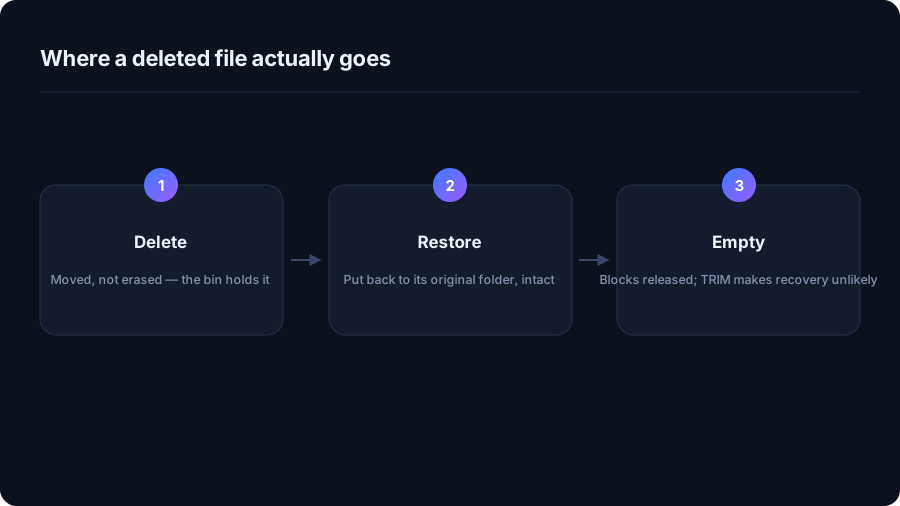
A normal delete moves the file
On Windows the file is moved into a hidden per-drive folder and recorded in the Recycle Bin
index. On macOS it moves to ~/.Trash on the same volume. Nothing is erased, which
is why the operation is instant for a 40 GB file, and why Restore on Windows or
Put Back on macOS returns it exactly where it was.
The bin is not infinite. Windows sizes it per drive and starts discarding the oldest entries once the quota is reached, so "it will be in the bin" is only true for a while.
The deletions that skip the bin entirely
- Shift + Delete on Windows, and Option + Command + Delete on macOS.
- Network drives and most USB sticks — no bin exists on the volume, so the delete is immediate.
- Files larger than the bin's quota — Windows asks whether to delete permanently instead.
- Command line deletes —
del,rm,rmdir /sandRemove-Itemdo not use the bin. - Many applications' own cleanup features, which call the delete API directly.
Why recovery tools rarely rescue an SSD
When you empty the bin, the filesystem marks those blocks free and TRIM tells the drive it may erase them. On an SSD that usually happens within seconds, and the data is genuinely gone — unlike a spinning disk, where undelete tools often worked. Treat "emptied the bin" as permanent.
What actually protects you
- A backup. Time Machine, File History, or anything off the machine. Nothing else is a real answer.
- Versioned cloud folders. OneDrive, iCloud Drive, Dropbox and Google Drive all keep deleted items and previous versions for a period — often 30 days.
- A restore point, on Windows, for system files specifically. It is not a document backup.
- A preview before deleting. The cheapest protection there is: see the list, untick what you want to keep, then confirm.
How DriveXos handles it
Cleanups send files to the Recycle Bin or Trash by default, so the normal safety net applies. Permanent deletion exists but has to be chosen deliberately in the confirmation dialog, and on Windows a system restore point can be taken first. Every cleanup is recorded, so you can see what was removed and when — getting a file back walks through it.
How much the bin is allowed to hold
On Windows each drive gets its own quota, set in the Recycle Bin properties and sized by default as a percentage of the volume. Once it is exceeded, the oldest deleted files are purged silently to make room for the newest. macOS does not cap the Trash, but it does offer to empty items automatically after 30 days — worth switching on if you routinely forget.
A practical consequence: after deleting something very large, the bin may discard several older items you assumed were still recoverable.
| Action | Recoverable from the bin? |
|---|---|
| Delete key in Explorer or Finder | Yes |
| Shift + Delete, or Option + Command + Delete | No |
| Delete on a USB stick or network share | Usually not |
rm, del, Remove-Item | No |
| Uninstalling an application | No |
| Emptying the bin | No — and on an SSD, not by tools either |
If you have just deleted something important
- Check the bin first. Most of the time the file is simply there.
- Check your cloud folder's web interface. OneDrive, iCloud, Dropbox and Google Drive all keep a deleted-items area independent of the local bin.
- Check backups. Time Machine, File History, or your own copies.
- Stop writing to the drive if it is a spinning hard disk and nothing above worked. Every write reduces what a recovery tool can find. On an SSD this rarely helps, but it costs nothing.
The habit that prevents all of this
Preview before you confirm. Any tool that deletes without showing you the list first — or that hides the list behind a "recommended" button — is asking you to trust it with a decision it cannot make for you. A cleanup you can read is a cleanup you can undo.
Quick answers
Can I recover a file after emptying the Recycle Bin?
On an SSD, usually not: TRIM lets the drive erase the freed blocks within seconds. On an older spinning hard disk, recovery tools sometimes succeed if you stop writing to the drive immediately. A backup is the only reliable answer.
Why do some deletions skip the Recycle Bin?
Shift+Delete, deletes on network drives and most USB sticks, files bigger than the bin quota, and anything removed from a command line all bypass it.
Does DriveXos delete files permanently?
Only if you choose that in the confirmation dialog. By default everything goes to the Recycle Bin on Windows or the Trash on macOS.
See where your space actually went
DriveXos scans a drive in seconds, shows every folder by size, and removes only what you tick — on Windows and Mac, free to use.