
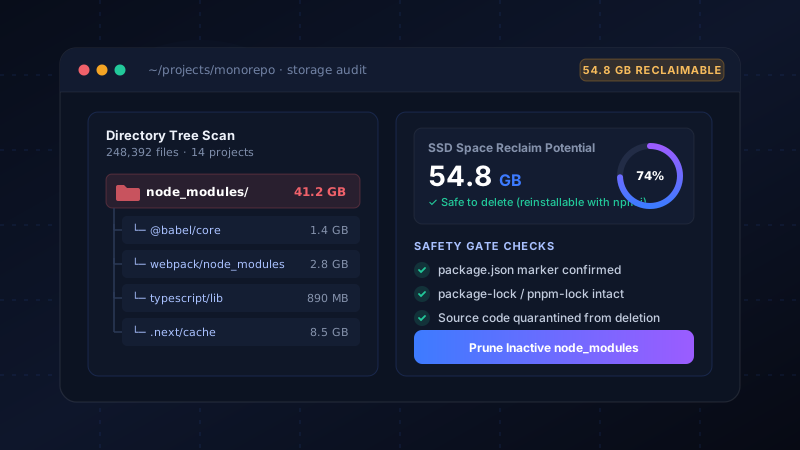
The Anatomy of Dependency Inflation
Modern JavaScript development relies on rich package ecosystems. A typical Next.js, Vite, or React application starts with an innocent package.json listing 20 to 30 direct dependencies. However, once npm or yarn resolves transitive sub-dependencies, your project easily explodes into 1,200+ distinct packages and over 40,000 files on disk.
Multiply that across twenty side projects, tutorials, client spikes, and archived prototypes from the last year, and you are sitting on 40GB to 80GB of duplicated code. A single library like TypeScript, Webpack, or Babel may be installed 15 times in separate folders across your SSD.
The Cluster Size Penalty (Disk Space vs. Size on Disk)
The sheer number of small files introduces an architectural penalty known as cluster slack. Modern filesystems (NTFS on Windows, APFS on macOS) allocate storage in 4KB blocks (clusters). When an npm package contains thousands of 200-byte READMEs, .d.ts files, and test stubs, each file consumes an entire 4KB sector.
Why 15 GB of Code Takes 24 GB of Real SSD Space
Because of the 4KB minimum cluster allocation on NTFS and APFS, 50,000 tiny files with an aggregate logical size of 15 GB will actually occupy 22 GB to 25 GB of physical blocks on your flash storage.
Why Windows Explorer and macOS Finder Stall
When you attempt to right-click and delete a legacy node_modules folder in Windows Explorer, you often encounter two notorious bottlenecks:
- The 260-Character MAX_PATH Limit: Deeply nested npm packages can create path lengths exceeding the standard Win32 260-character ceiling, causing Explorer to throw errors like "Source path too long".
- Synchronous Metadata Traversal: Explorer tries to calculate the exact file count and animation before deleting, making your system freeze for minutes.
Deleting via Command Line
If you want to remove an individual folder manually from the terminal, the fastest native commands bypass the GUI recycle loop:
# Fast recursive removal on Windows bypassing Explorer UI
rmdir /s /q node_modules

# Or using rimraf if installed globally
npx rimraf node_modules# Standard recursive force delete
rm -rf node_modulesThe Real Problem: Finding the Forgotten Folders
Running rm -rf node_modules works great when you know where the project is. But what about the 35 other projects scattered across D:\Code, F:\Workspace, and your user documents?
Manually checking every directory is tedious and error-prone. Blind automated cleanup scripts can accidentally delete active work or uncommitted branches.
How DriveXos Solves This Safely
DriveXos was built with a specialized Developer Cleanup Engine designed specifically for modern engineering stacks:
- Project Marker Validation: DriveXos never touches a folder named
node_modulesunless it validates a genuinepackage.jsonor lockfile at the root. - Age Threshold Filtering: Filter out projects touched in the last 30, 90, or 180 days. Your active morning project is never touched.
- 1-Click Reclaim: Reinstallable dependencies can be wiped in seconds, instantly returning 40GB+ to your drive. Whenever you reopen the project, a quick
npm installbrings it back.
| Cleanup Approach | Speed | Safety Checks | Finds Dormant Projects |
|---|---|---|---|
| Windows Explorer GUI | Very Slow (Stalls) | None | Manual only |
| CLI (npkill / rimraf) | Fast | Manual confirmation | Slow disk traversal |
| DriveXos | Instant (MFT index) | 3-Tier Safety Gate | Automatic across all drives |
Ready to Reclaim 50GB+ of Developer Bloat?
DriveXos identifies every dormant node_modules, build cache, and target directory across your computer in seconds.