
Understanding what the size means
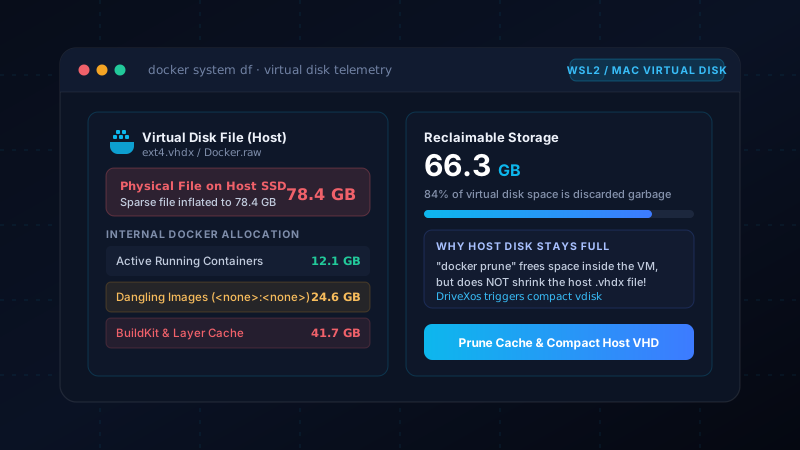
Docker Desktop stores Linux containers and images in a disk image on macOS. The maximum size reported for that file can differ from the storage it actually occupies, so a large Docker.raw figure is not automatically a measure of removable data. Docker documents this distinction.
DriveXos helps frame the problem by showing storage usage across the Mac. Folder analysis and the large-file view make it easier to see whether Docker-related storage is a major contributor or one of several large areas.
Docker-aware analysis
The Premium Docker analyzer reports image, container, volume and build-cache sizes, together with Docker-reported reclaimable space. That is more useful than treating the virtual disk as one unexplained file: it gives context about the kinds of Docker objects consuming storage.
For developers working across several projects, this breakdown helps distinguish Docker storage from dependency folders and other build caches. DriveXos brings these different sources of disk usage into the same storage investigation.
Cleanup through Docker
DriveXos uses Docker’s own prune mechanisms for supported Docker cleanup. Volume cleanup is opt-in and carries warnings because volumes can contain application data. The product’s benefit is an informed review of Docker cleanup candidates, not a promise that an entire virtual disk can be safely discarded.
Reclaimable Docker data and the space eventually returned to the Mac are different measurements. DriveXos does not guarantee an immediate reduction equal to Docker.raw’s displayed size. Its analysis helps explain the opportunity, while its Docker-aware cleanup avoids presenting direct virtual-disk deletion as routine cleanup.
A clearer view of your storage
Disk analysis, visual folder sizes and a cleanup preview that keeps you in control.