
Making a broad category easier to understand
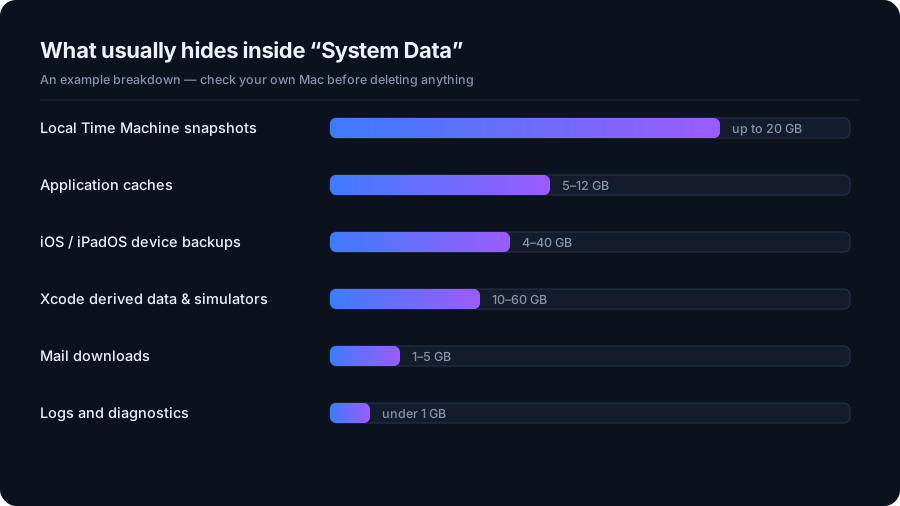
Apple describes System Data as a general storage category for files that do not fit more specific categories. Its size depends on the Mac and its use, so a large total alone does not establish how much can be removed. Apple explains the System Data category.
DriveXos adds a folder-level perspective. Its Storage Analyzer displays sizes and file counts, while the treemap makes large areas stand out. That helps connect a broad storage concern to the particular folders the app can access.
Context for everyday and developer Macs
On a Mac used for development, project dependencies and build caches can make storage needs very different from those of a machine used mainly for browsing and documents. DriveXos helps bring those folders into view through its analysis and developer cleanup features.
The Large Files view provides another angle by highlighting individual files that dominate disk usage. Together, these views help explain whether space is concentrated in a few large items or spread across many folders.
A realistic view of recoverable space
DriveXos presents supported cleanup candidates for review, including Mac caches, logs and temporary files. The benefit is understanding specific items and their sizes before deciding on cleanup, rather than assuming the entire System Data figure is expendable.
A filesystem scan may not match the System Data total shown by macOS. Access permissions and system-managed storage affect what is visible, and DriveXos does not promise to remove every byte in that category. It helps turn an unclear total into a more useful view of accessible storage and potential cleanup opportunities.
A clearer view of your storage
Disk analysis, visual folder sizes and a cleanup preview that keeps you in control.