
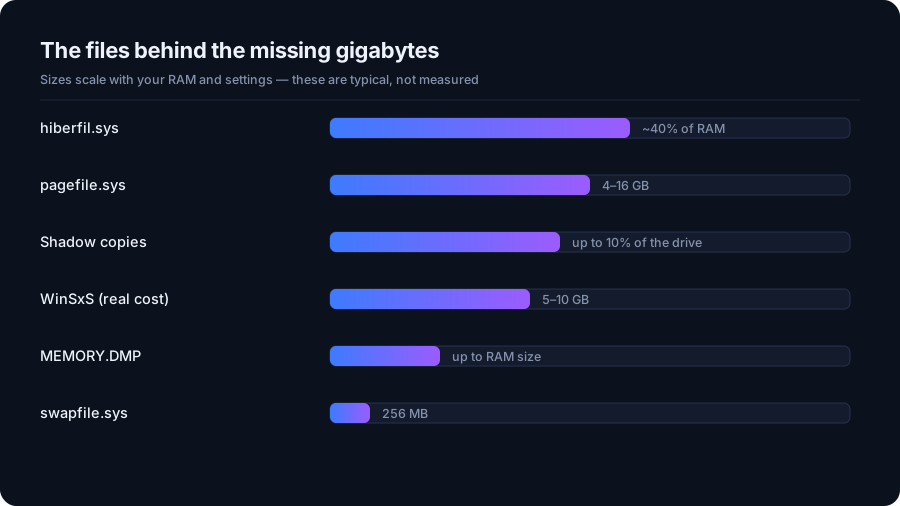
Understanding the space behind the filename
Windows uses pagefile.sys to support virtual memory, including holding memory pages that are not currently needed in physical RAM. It is not simply a full copy of RAM created only after memory runs out. Microsoft explains how page files support memory and crash dumps.
For someone investigating a full C drive, the useful distinction is between storage that supports Windows and files that may no longer be needed. DriveXos helps with the disk-space side of that question through its folder breakdown, large-file view and risk information.
A broader view of a full Windows drive
A memory-related system file can draw attention because of its size, but it may not be the main reason a drive feels crowded. Downloads, old installers, duplicate files and development folders can occupy substantial space alongside Windows data.
DriveXos makes those other contributors easier to compare. Its treemap shows how storage is distributed, and its largest-first folder view helps explain where the biggest totals come from. This gives a clearer picture than focusing on a single unfamiliar filename.
Storage cleanup with context
DriveXos provides a preview and safety checks for cleanup rather than treating every large file as disposable. Its value here is helping identify suitable cleanup candidates elsewhere on the drive while making the distinction between file size and removal risk visible.
DriveXos is a disk-space analyzer, not a RAM expansion tool. Recovering storage does not add physical memory or guarantee that a memory-heavy application will run faster. It does make it easier to understand how ordinary files are competing for room on the same disk.
A clearer view of your storage
Disk analysis, visual folder sizes and a cleanup preview that keeps you in control.