
User guide · 7 of 9
Every tool, and the plan it needs
Sixteen tools. Six are free forever; the rest come with the one-time licence.
| Tool | What it does | Plan |
|---|---|---|
| Dashboard | Drive health, space used, and a scan button | Free |
| Visualize Space | Your drive as blocks, sized by what they use | Free |
| Storage Analyzer | Folders listed largest first | Free |
| Large Files | The single biggest files on the drive | Free |
| Windows Cleanup | Temporary files, caches, logs and the Recycle Bin | Free |
| Settings | Theme, exclusions, scan speed, updates | Free |
| Intelligent Search | Find files by name, size, type or age | Premium |
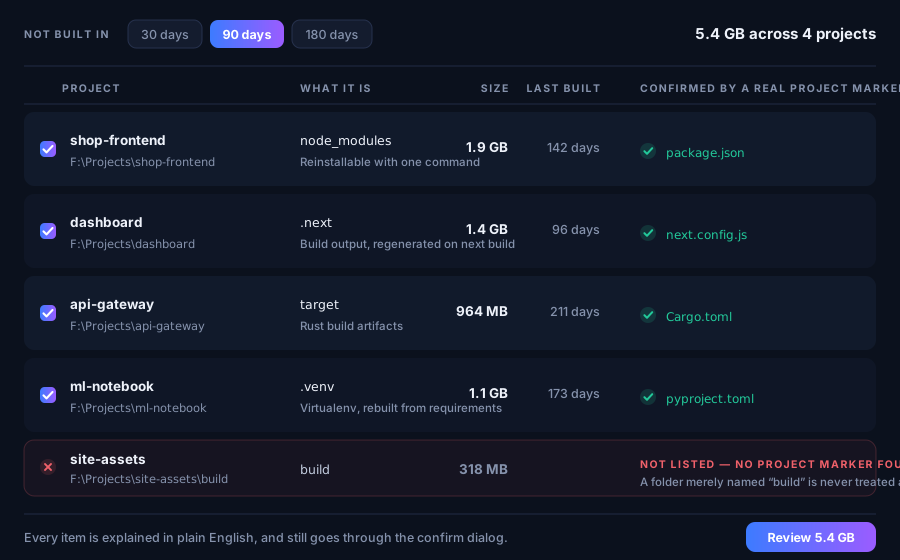
| Developer Cleanup | Build folders and caches, each confirmed as real project output | Premium |
| Docker | Reclaims space through Docker's own prune | Premium |
| WSL | Shows Linux disk usage and how to shrink it — read-only | Premium |
| Duplicates | Identical files, matched by full checksum | Premium |
| Applications | What each installed app is costing you in space | Premium |
| App Uninstaller | Removes apps and the leftovers they leave behind | Premium |
| System Monitor | Live disk, memory and processor use | Premium |
| Storage History | How your free space has moved over time | Premium |
| Cleanup History | Every cleanup you have run, and what it freed | Premium |
For developers
Developer Cleanup only lists a build folder once it has confirmed the folder really
is output of a real project, so a folder that merely happens to be called
build is never flagged. Docker reclaims space through Docker's own
prune, with volumes opt-in. WSL is strictly read-only: it shows what your Linux disk
is using and how to shrink it, and never deletes a virtual disk.
Premium is one payment, kept for good — see pricing, or how to activate a key you already have.
Something here unclear, or not working for you?